.png)

What is encryption? At rest, in transit and in use — the complete beginner's guide
Three states of data, three kinds of encryption — and the one state most organisations have never heard of.
Introduction
Encryption is one of those words that appears in every privacy policy, security audit and vendor proposal — yet almost nobody can explain what it actually does. This guide covers everything from first principles: what encryption is, the three states of data it can protect, and why the third state is the one most organisations have never heard of. No prior technical knowledge required.
What is encryption?
Encryption is the process of transforming readable data (plaintext) into an unreadable form (ciphertext) using a mathematical function and a secret value called a key. Only someone with the correct key can reverse the process and read the original data.
A practical analogy: imagine a document written in a language that only you and the recipient know. Anyone who intercepts it sees nonsense. Only the recipient reads the message.
In computing, modern encryption — specifically AES-256 — is so mathematically complex that a supercomputer attempting to guess the key by brute force would take longer than the age of the universe.
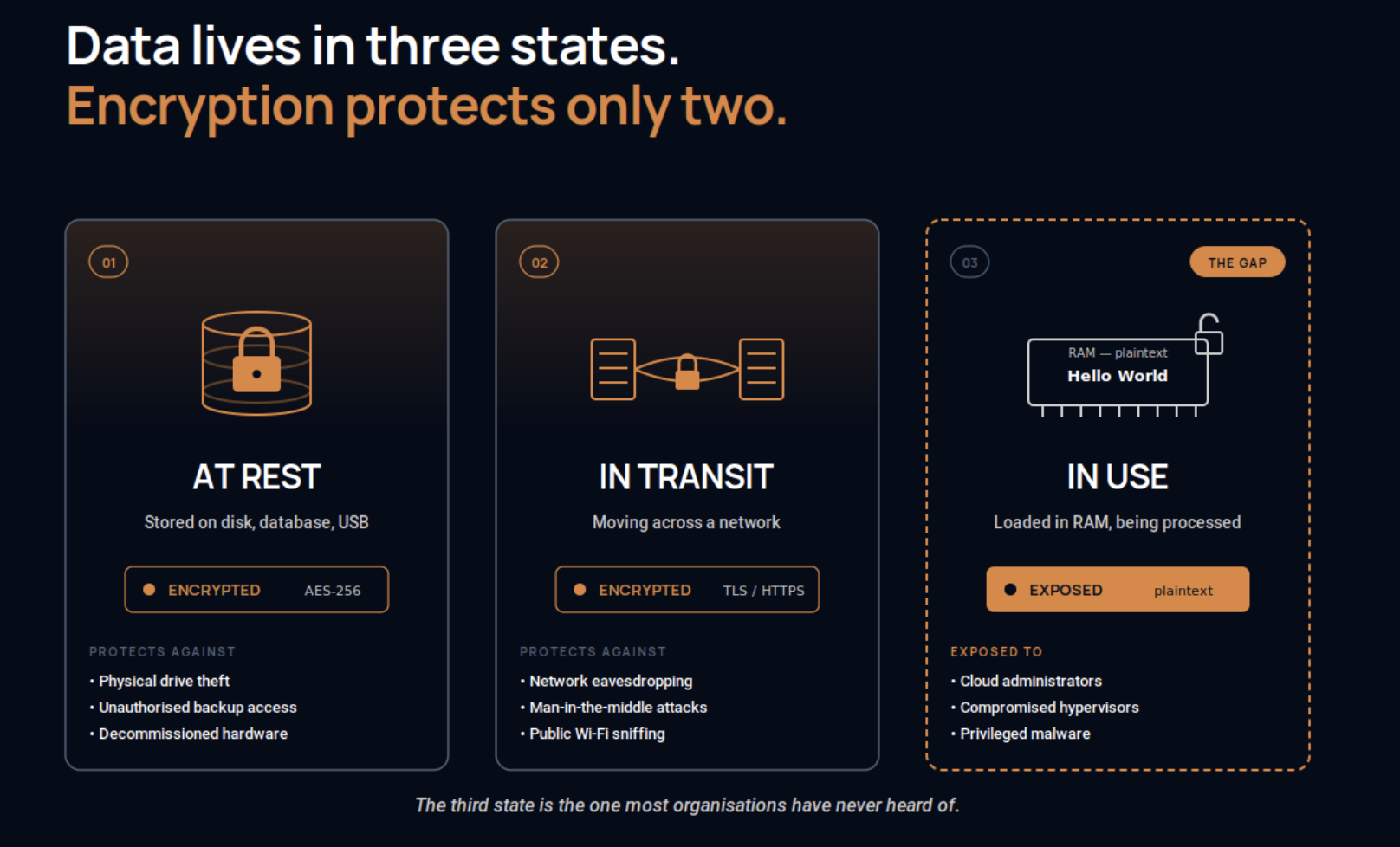
The three states of data
State 1: data at rest
Data at rest is data stored on a disk, database, USB drive or any persistent storage medium. Encrypting it means that even if someone physically steals the hard drive, they cannot read its contents without the decryption key. This is the most widely deployed form of encryption; almost all modern cloud storage services do it by default.
What it protects against: physical theft of storage media, unauthorised access to backup files, data exposure from decommissioned hardware.
State 2: data in transit
Data in transit is data moving across a network — from your browser to a server, from one server to another, from a mobile app to a database. Encrypting it, typically using TLS, means that even if someone intercepts the data mid-journey, they cannot read it. The padlock icon in your browser indicates TLS is active.
What it protects against: network eavesdropping, man-in-the-middle attacks, packet sniffing on public Wi-Fi.
State 3: data in use — the gap
Data in use is data actively being processed. When a database runs a query, when a server renders a page, when an application performs a calculation, the data must be decrypted and loaded into memory for the processor to work with it.
This is the unprotected dimension. While data is in use it exists as plaintext in RAM, and anyone with access to that memory — a cloud administrator, a compromised hypervisor, malicious software with elevated privileges — can read it. This is the data-in-use gap, and it is the attack vector behind many of the most significant breaches of the past decade.
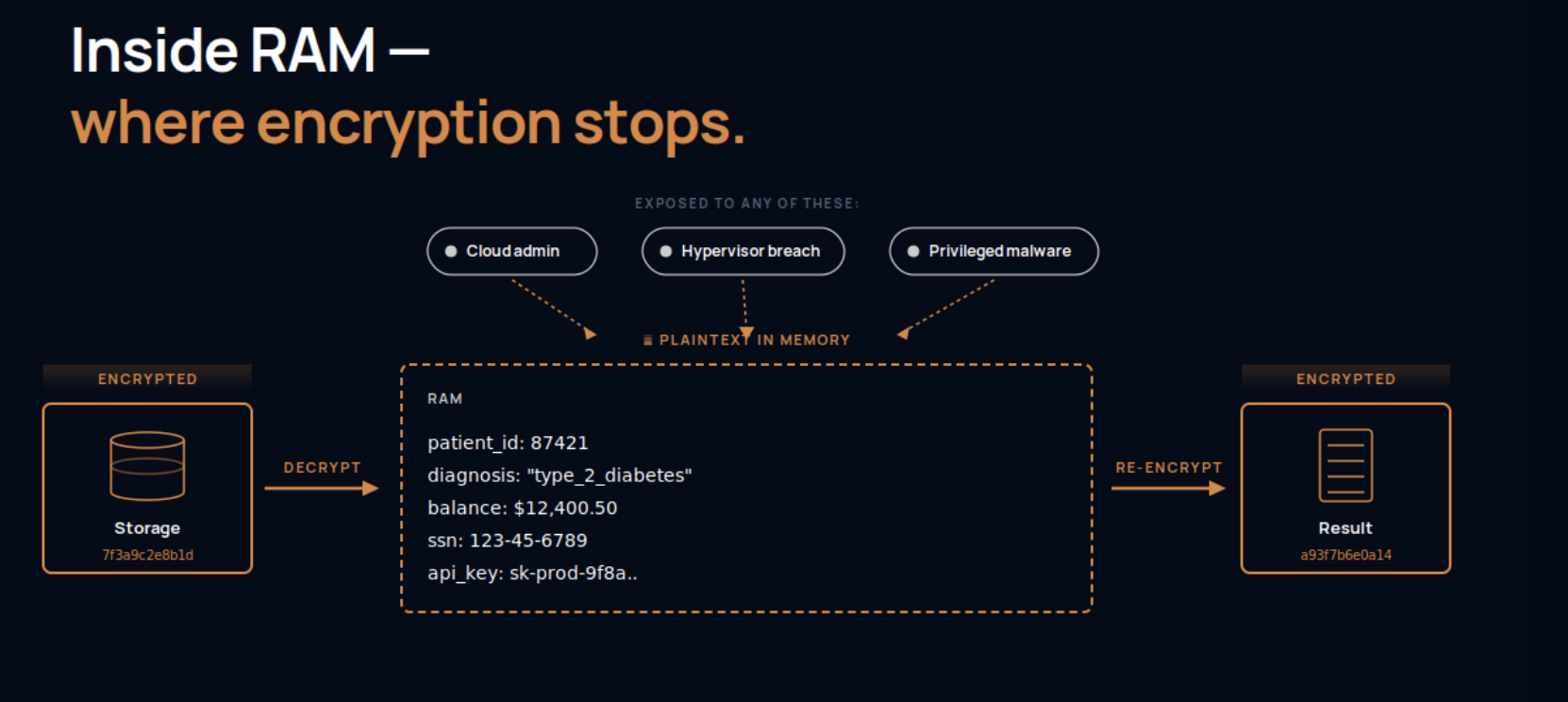
That window is the attack surface
Why the data-in-use gap matters
Consider a hospital using a cloud provider to run patient record queries. The records are encrypted on disk and encrypted during transfer to the cloud. But when the cloud runs the actual query, the data is decrypted in the provider's memory.
The provider's infrastructure administrators can, in theory, access that memory. So can any attacker who has compromised the hypervisor layer. The hospital's encryption has a backdoor.
This is not a theoretical concern. Healthcare data breaches, financial data exposure and intellectual property theft have all exploited the data-in-use gap.
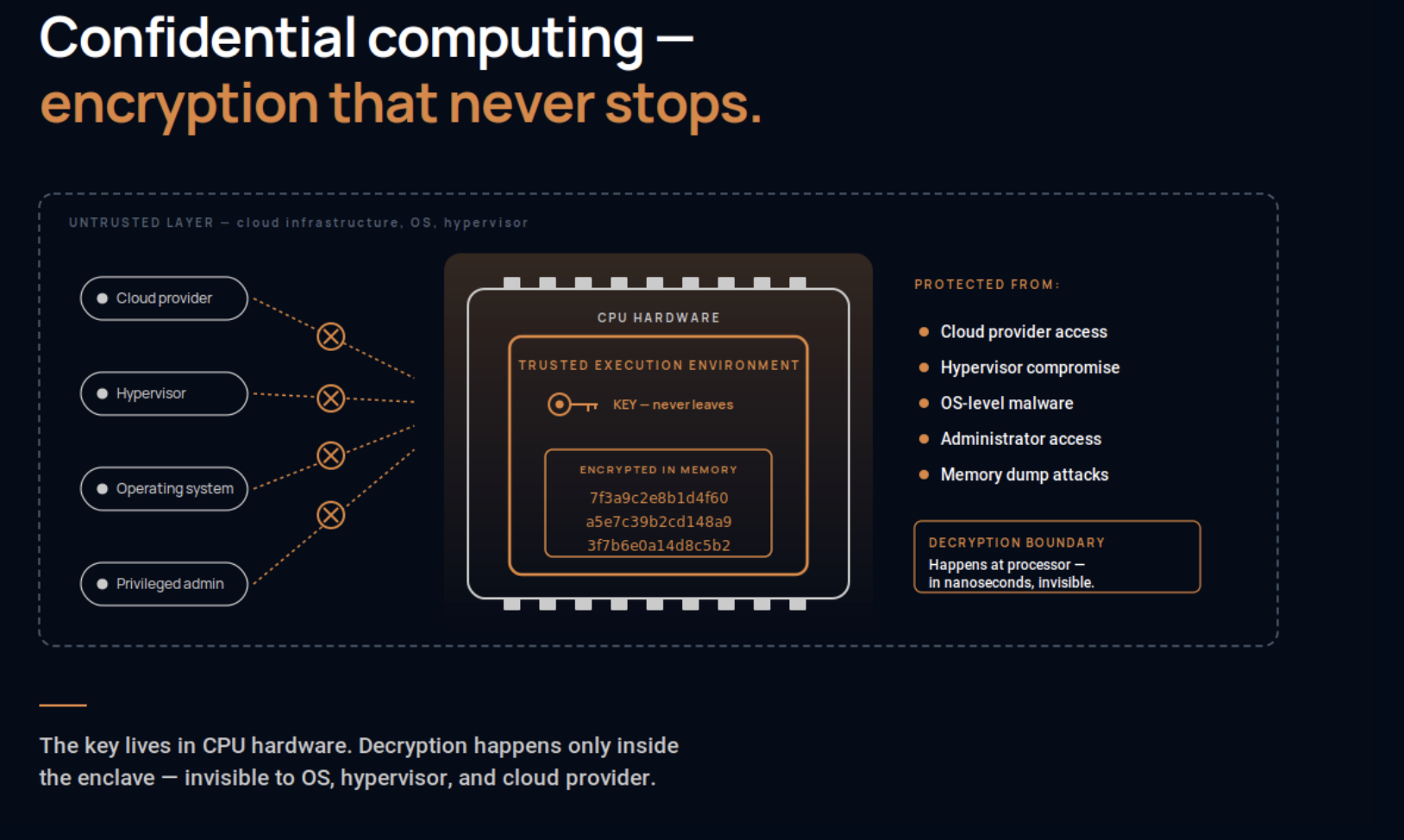
The solution: confidential computing
Confidential computing closes the gap. Using hardware-based trusted execution environments, it keeps data encrypted in memory even while the CPU is actively processing it.
The encryption key resides inside the CPU hardware itself and never leaves. Data is decrypted and re-encrypted at the processor boundary in nanoseconds, invisible to the operating system, the hypervisor and the cloud provider. This is the third lock — the one that completes continuous encryption across all three states.
Summary
- Data at rest, encrypted on disk, protects against storage theft.
- Data in transit, encrypted across the network, protects against interception.
- Data in use, encrypted in memory through confidential computing, protects against compromised infrastructure and privileged access.
See the sealed version on your own stack, with the evidence your auditor gets to check.
TALK TO AN EXPERT →